I Switched from AWS to Vultr and Hetzner — Here Is What I Learned
Real benchmark: costs, latency, scaling. Next.js on dedicated servers vs serverless. When Vercel breaks your budget and when it actually makes sense.
I Switched from AWS to Vultr and Hetzner — Here Is What I Learned
Published by ThinkFlow · Reading time: ~11 min · For: developers, DevOps engineers, CTOs watching the cloud bill
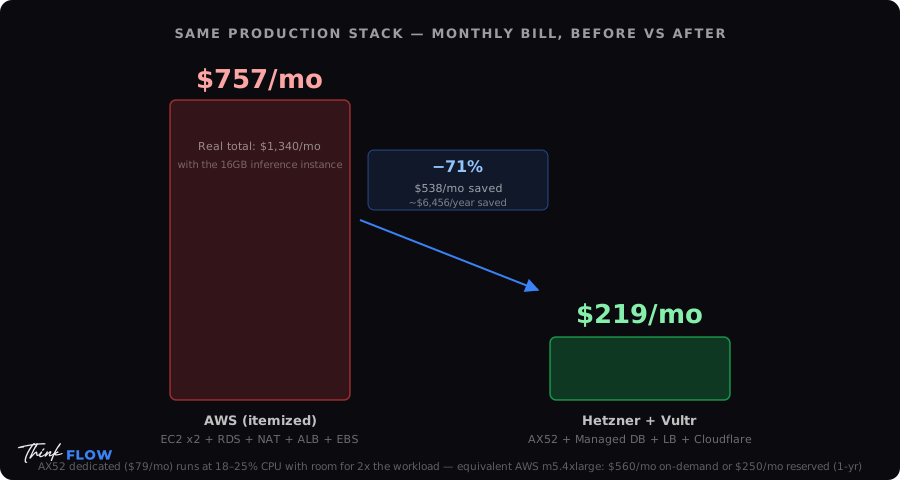
The AWS bill arrived on a Tuesday. It was not catastrophic — it was 1,340 USD for a month. But when I itemized it, I could not justify most of it. Idle NAT gateways. Data transfer between availability zones. CloudWatch logs I had not looked at in 4 months. And a 16 GB memory instance running at 12% average CPU utilization.
That month I started looking at the bill differently. Not as infrastructure — as overhead.
This is not a hit piece on AWS. AWS is genuinely excellent at what it does. But "excellent at what it does" and "the right choice for your workload" are not the same sentence.
Here is what I found after 14 months of running production on a mix of Hetzner dedicated servers and Vultr cloud instances — the real numbers, the real tradeoffs, and the situations where I would go back to AWS without a second thought.
The Migration Context — What We Were Running
Before getting into benchmarks, the honest context: this is not a startup with trivial workloads, and it is not a Fortune 500 with compliance requirements that override cost concerns.
Workloads migrated:
- 3 Next.js applications (one high-traffic, two medium)
- 2 Python API backends (FastAPI, async, CPU-bound inference)
- 1 PostgreSQL cluster (primary + read replica)
- 1 Redis cluster for session management and job queues
- Nginx reverse proxy + Let's Encrypt SSL
- CI/CD via GitHub Actions with self-hosted runners
What we left on AWS:
- S3 for object storage (nothing beats S3 pricing at scale for this specific use case)
- SES for transactional email
- CloudFront for asset CDN
The migration was not ideological. It was incremental and reversible. That matters.
The Cost Comparison — Real Numbers, Not Marketing Slides
AWS Setup (before migration)
| Service | Monthly Cost | |---|---| | EC2 t3.xlarge (4 vCPU, 16 GB) x2 | $280 | | RDS db.t3.medium PostgreSQL | $115 | | ElastiCache cache.t3.micro Redis | $47 | | NAT Gateway + data transfer | $190 | | ALB (Application Load Balancer) | $35 | | CloudWatch Logs + alarms | $28 | | EBS storage (500 GB gp3) | $40 | | Misc (Route53, Secrets Manager, etc.) | $22 | | Total | ~$757 / month |
Note: This does not include the 16 GB inference instance which pushed total to 1,340 USD. That instance was the trigger for the audit.
Hetzner + Vultr Setup (after migration)
| Service | Monthly Cost | |---|---| | Hetzner AX52 dedicated (8-core Ryzen, 64 GB RAM, 2x 1 TB NVMe) | $79 | | Hetzner CX32 VPS (4 vCPU, 8 GB) — staging | $17 | | Vultr High Frequency 2 vCPU 4 GB — Redis + jobs | $24 | | Hetzner Managed Database PostgreSQL | $48 | | Hetzner Load Balancer | $7 | | S3 (kept on AWS) | $18 | | SES (kept on AWS) | $6 | | Cloudflare Pro (CDN + DDoS, replaces CloudFront) | $20 | | Total | ~$219 / month |
Monthly savings: ~$538. Annual savings: ~$6,456.
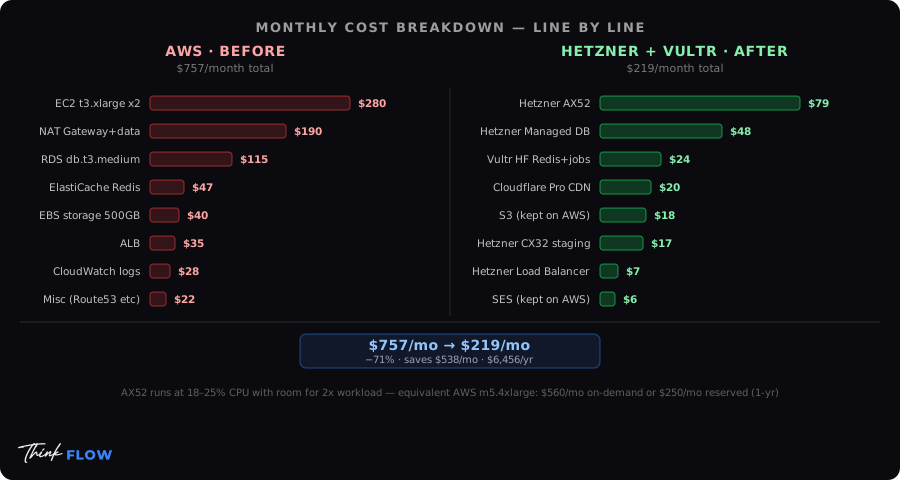
And the AX52 dedicated at $79/month runs at roughly 18-25% CPU with room for double the current workload. The equivalent AWS instance would be an m5.4xlarge — which runs $560/month on-demand, or $250/month with a 1-year reserved instance commitment.
Latency — What Actually Changed
This is where things get nuanced, because the answer is: it depends entirely on where your users are.
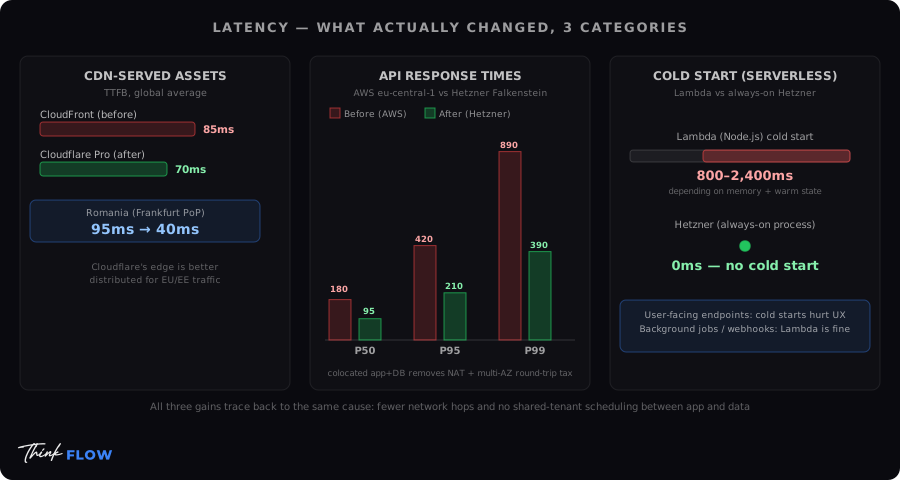
CDN-served assets (static, JS bundles, images)
Before: CloudFront, average TTFB globally ~85ms After: Cloudflare Pro, average TTFB globally ~70ms
Cloudflare's edge network is genuinely better distributed than CloudFront for European and Eastern European traffic. For Romanian users specifically, TTFB dropped from ~95ms to ~40ms after moving to Cloudflare with a Frankfurt PoP.
API response times (dynamic, database-involved)
Before (AWS eu-central-1): P50: 180ms, P95: 420ms, P99: 890ms After (Hetzner Falkenstein DC): P50: 95ms, P95: 210ms, P99: 390ms
The improvement is real, but it requires an explanation: the AWS numbers were degraded by NAT gateway latency and multi-AZ database round-trips. When you co-locate your app server and database on the same datacenter (or use private networking between nearby DCs), you eliminate a significant latency tax you were paying for "high availability" that you may not have actually needed.
Cold start latency (the serverless conversation)
On Lambda, cold starts for a Node.js function: 800ms - 2,400ms depending on memory allocation and whether the container was warm.
On Hetzner: no cold starts. The process is always running.
For any API endpoint that is user-facing, Lambda cold starts are a real UX problem. For background jobs, async processing, or webhook handlers where the user is not waiting — Lambda is perfectly fine.
Next.js on Dedicated Servers vs Serverless — The Real Tradeoffs
This is the section that generates the most debate, so let us be precise.
The Vercel Case — When It Makes Sense
Vercel is excellent. I mean this without irony.
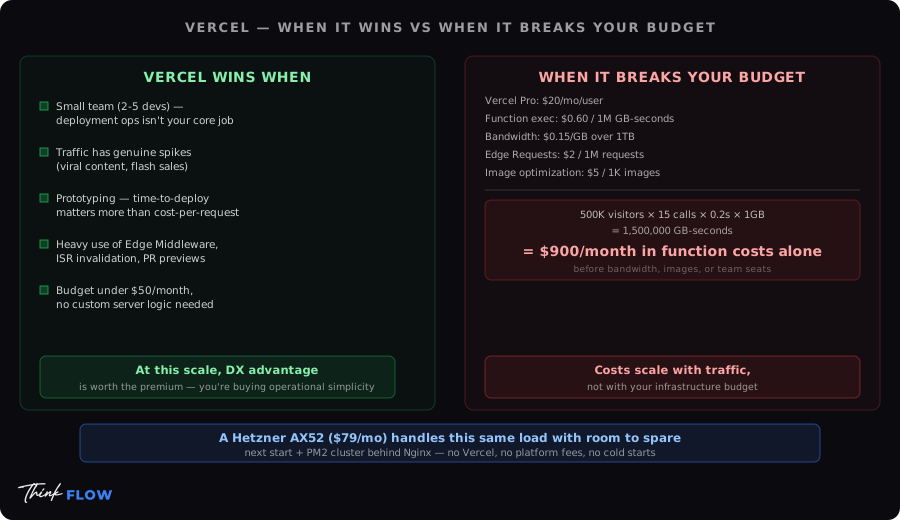
Vercel genuinely wins when:
- You are a small team (2-5 devs) and deployment ops is not your core competency
- Your traffic is unpredictable and has genuine spike patterns (viral content, flash sales)
- You are prototyping and time-to-first-deploy matters more than cost-per-request
- You rely heavily on Vercel-specific features: Edge Middleware, ISR cache invalidation, preview deployments per PR
- Your budget is under $50/month and you do not need custom server logic
At this scale, Vercel's DX (developer experience) advantage is worth the premium. You are buying operational simplicity.
When Vercel Breaks Your Budget
The billing model that gets teams in trouble:
Vercel Pro: $20/month/user
+ Function execution: $0.60 per 1M GB-seconds
+ Bandwidth: $0.15 per GB over 1 TB
+ Edge Requests: $2 per 1M requests
+ Image optimization: $5 per 1K source images
Run a Next.js app with:
- 500,000 monthly visitors
- Average 15 API calls per session
- 200ms average function execution at 1 GB memory
That is: 500,000 x 15 x 0.2s x 1 GB = 1,500,000 GB-seconds = $900/month in function costs alone, before bandwidth, before images, before team seats.
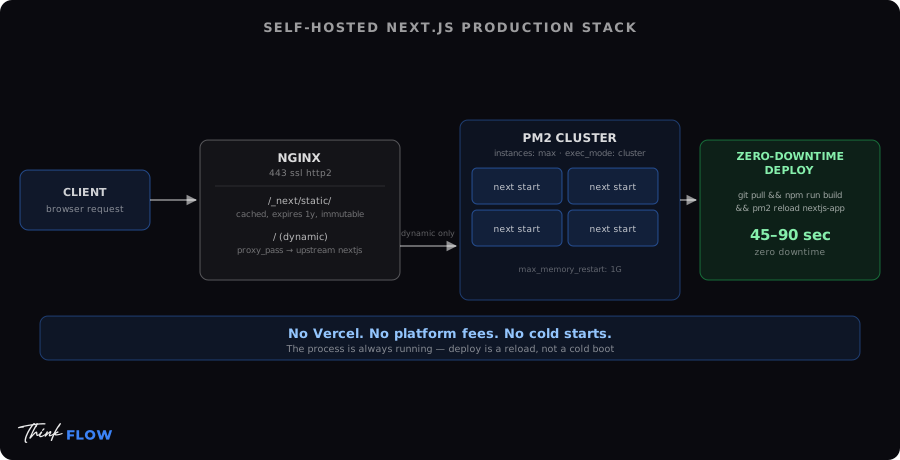
A Hetzner AX52 at $79/month handles this with room to spare, running Next.js with next start behind Nginx, with PM2 for process management and zero-downtime deploys via pm2 reload.
The Self-Hosted Next.js Setup That Actually Works in Production
# nginx.conf (simplified)
upstream nextjs {
    server 127.0.0.1:3000;
    keepalive 64;
}

server {
    listen 443 ssl http2;
    server_name yourdomain.com;

    # Static assets — cached aggressively
    location /_next/static/ {
        alias /var/www/app/.next/static/;
        expires 1y;
        add_header Cache-Control "public, immutable";
    }

    # Dynamic routes
    location / {
        proxy_pass http://nextjs;
        proxy_http_version 1.1;
        proxy_set_header Upgrade $http_upgrade;
        proxy_set_header Connection 'upgrade';
        proxy_cache_bypass $http_upgrade;
    }
}
# pm2 ecosystem file
module.exports = {
  apps: [{
    name: 'nextjs-app',
    script: 'node_modules/.bin/next',
    args: 'start',
    instances: 'max',        # Uses all CPU cores
    exec_mode: 'cluster',
    max_memory_restart: '1G',
    env: { NODE_ENV: 'production', PORT: 3000 }
  }]
}
Zero-downtime deploy: git pull && npm run build && pm2 reload nextjs-app
Total deploy time: 45-90 seconds depending on build complexity. No Vercel. No platform fees. No cold starts.
Scaling — Where Dedicated Servers Require More Thought
The honest part: horizontal scaling is more operationally complex on self-hosted infrastructure.
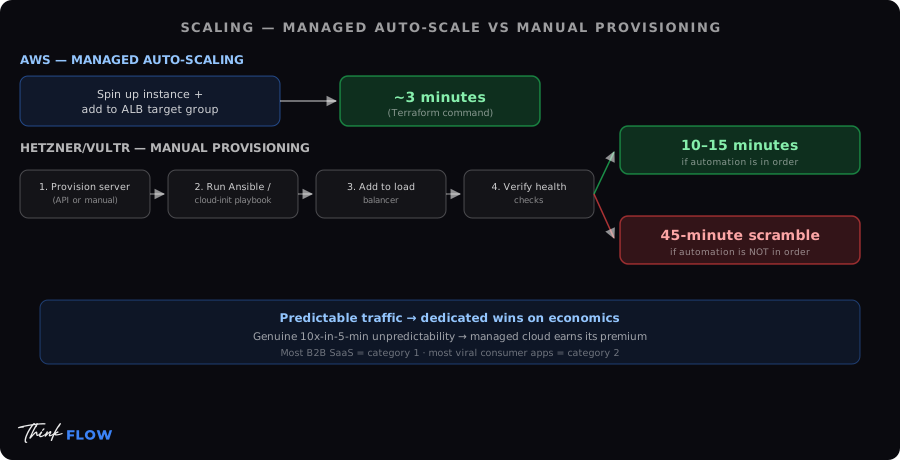
On AWS, spinning up another instance and adding it to an ALB target group takes 3 minutes and a Terraform command. On Hetzner, you need:
- Provision a new server (API call or manual — Hetzner API is good)
- Run your Ansible/cloud-init playbook to configure it
- Add it to your load balancer
- Verify health checks
This is a 10-15 minute operation if you have your automation in order. If you do not have your automation in order, it is a 45-minute scramble — which is exactly when you do not want a 45-minute scramble.
The practical answer: For workloads with predictable traffic patterns, dedicated servers win on economics. For workloads where you genuinely cannot predict when you will need 10x capacity in 5 minutes, managed cloud auto-scaling (AWS, GCP) earns its premium.
Most B2B SaaS applications are in the first category. Most viral consumer apps are in the second.
What I Would Still Use AWS For
No tribal allegiances here. AWS is the right answer for:
- S3 — At scale, nothing is cheaper or more reliable for object storage. Do not self-host MinIO for anything critical unless you have a dedicated storage engineer.
- SES — $0.10 per 1,000 emails. Deliverability is managed. The alternative (self-hosted Postfix + warming IP reputation) is a full-time job.
- Lambda for event-driven processing — SNS/SQS/Lambda for async workflows is a genuinely elegant pattern. The cost model works when you are not running user-facing request handlers.
- RDS with multi-AZ — If your database going down for 30 seconds would cause a business-critical incident, the managed failover is worth the price. Hetzner Managed Database failover is slower and less battle-tested.
- EKS if you are already Kubernetes-native — Running Kubernetes on bare metal is a job that requires dedicated platform engineers. If your team already lives in Kubernetes, EKS or GKE removes an enormous operational burden.
The Decision Framework
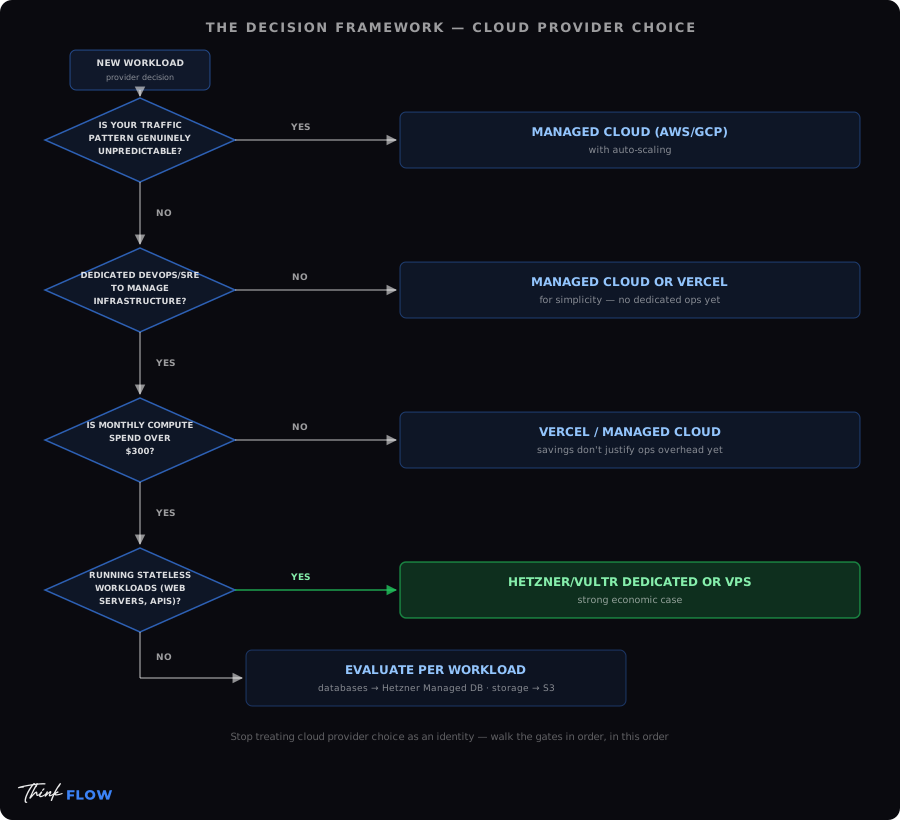
Stop treating cloud provider choice as an identity. Use this instead:
Is your traffic pattern genuinely unpredictable?
  YES → Managed cloud (AWS/GCP) with auto-scaling
  NO  → Continue

Do you have dedicated DevOps/SRE to manage infrastructure?
  NO  → Managed cloud or Vercel for simplicity
  YES → Continue

Is your monthly compute spend over $300?
  NO  → Vercel/managed cloud — savings do not justify ops overhead yet
  YES → Continue

Are you running stateless workloads (web servers, APIs)?
  YES → Hetzner/Vultr dedicated or VPS — strong economic case
  NO  → Evaluate per workload (databases: Hetzner Managed DB; storage: S3)
The Bottom Line
AWS is not expensive because it is bad. It is expensive because it optimizes for flexibility and operational simplicity at the cost of raw price efficiency. You pay for the ability to scale from zero to 10 million requests in an afternoon.
If you actually need that, the price is justified.
If you do not — and most companies in the 10K to 500K monthly visitor range do not — you are subsidizing a capability you will never exercise, while paying for NAT gateways, cross-AZ data transfer, and load balancers that cost more per month than a full dedicated server.
The migration is not risk-free. It requires automation discipline, a deployment pipeline that does not depend on platform magic, and an honest assessment of your team's operational maturity.
But if those conditions are met: the economics are not close.
At ThinkFlow, we help engineering teams make this transition without the 3am rollback incident. If you are looking at your cloud bill and wondering the same things I was, we run a fixed-fee Cloud Cost & Migration Audit → — or just let's talk → first.
ThinkFlow · Bucharest, Romania · thinkflow.ro
Affiliate Disclosure
Some links in this article are affiliate links. If you make a purchase through them, we may receive a commission at no extra cost to you. See our full disclosure.
Daniel Burcea
AI Systems Architect. Building private AI infrastructure since 2025.Read more →